User Safety - Incoin Pay (Incoinpay) | Official Safety Guide 2026
Your safety is our top priority. Learn how to protect your Incoin Pay account, recognize phishing attempts, trade securely, and avoid scams on India's trusted C2C token trading platform.
Join Official Telegram Safety Channel Back to HomepageWhy User Safety Matters on Incoin Pay (Incoinpay)
Incoin Pay (also called Incoinpay) is a C2C (customer-to-customer) token trading platform where users buy and sell digital tokens directly via UPI. Because transactions happen directly between users, safety practices are essential.
Thousands of Indian users trade daily on Incoinpay. With peer-to-peer transactions come responsibilities. Understanding how to protect your account, recognize fake profiles, verify legitimate payments, and avoid common scams ensures a smooth and profitable experience.
This official safety guide covers everything you need to know about staying secure on Incoin Pay — from account setup to withdrawal best practices. Whether you are a new user or an experienced trader, these safety tips will help you trade with confidence.
🔐 Account Security - How to Protect Your Incoinpay Account
Your Incoin Pay account contains your earnings, trading history, and personal information. Follow these essential security practices to keep it safe:
- ✅ Use a Strong Password: Create a password with at least 8 characters including uppercase, lowercase, numbers, and special symbols. Never use the same password on other websites.
- ✅ Never Share Your OTP: The Incoin Pay login OTP is strictly personal. No support agent, moderator, or admin will ever ask for your OTP. Anyone requesting it is a scammer.
- ✅ Protect Your 6-Digit PIN: After Telegram verification, you set a 6-digit PIN for order confirmation. Memorize it. Never write it down or share it with anyone.
- ✅ Logout After Use: If using a shared device, always log out of your Incoinpay account after each session. Do not check "Remember Me" on shared phones.
- ✅ Regular App Updates: Keep your Incoin Pay app updated to the latest version. Updates include security patches and bug fixes. Always download from incoinpay.org.in.
- ✅ Device Security: Keep your phone locked with a PIN, pattern, or biometric. Enable Find My Device on Android to remotely lock or wipe your phone if lost.
🎣 Phishing Awareness - Recognize & Avoid Fake Websites
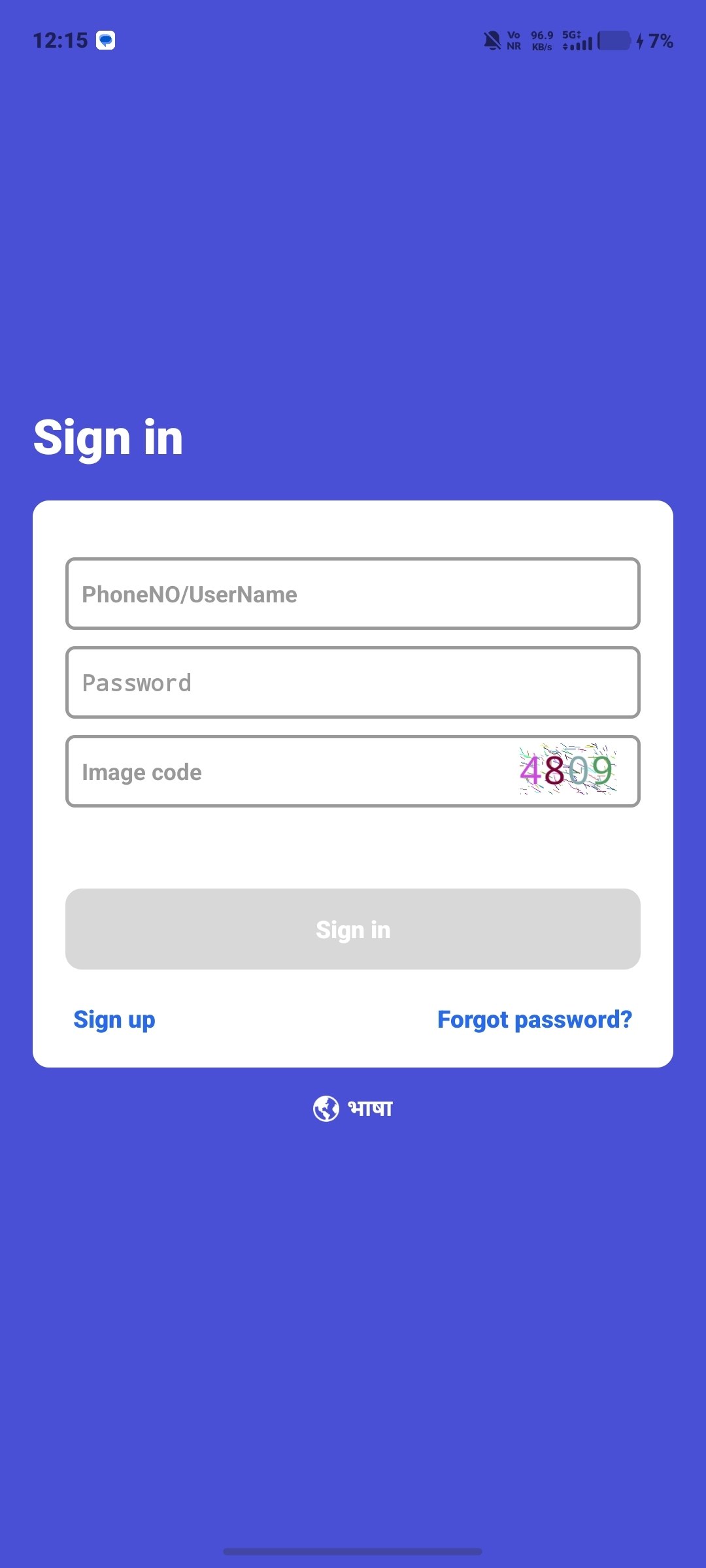
Phishing is the most common threat facing Incoin Pay users. Scammers create fake websites that look identical to the official platform to steal your login credentials.
- ✅ Always Check the URL: The only official website is incoinpay.org.in. Look for the padlock icon (🔒) in the address bar. Fake sites often use domains like incoin-pay.com, incoinpay.net, incoinpay.org, incoinpayapp.com etc.
- ✅ Bookmark the Official Site: Save incoinpay.org.in as a bookmark. Always access the platform through your bookmark, not through Google ads or Telegram links.
- ✅ Check for HTTPS: The official website uses HTTPS (SSL certificate). Fake sites may use HTTP or have invalid SSL certificates.
- ✅ Verify Email Senders: Incoin Pay sends emails only from official domains. Check the sender address carefully. Scammers use lookalike email addresses like support@incoin-pay.org or admin@incoinpayorg.com.
- ⚠️ No Download from Third Parties: The Incoinpay APK is only available on incoinpay.org.in. Never download the APK from third-party websites, Telegram groups, or unknown sources.
🤝 Safe Trading - C2C Token Trading Best Practices on Incoinpay
Since Incoin Pay operates on a C2C (customer-to-customer) model, you trade directly with other users. Follow these safe trading guidelines:
- ✅ Verify UPI Payments Immediately: When selling tokens, check your UPI app or bank account for the exact payment before confirming the order in the Incoinpay app. Never rely on screenshots alone.
- ✅ Trade with Verified Users: Prioritize trading with users who have a higher number of completed orders and positive ratings on the Incoinpay platform. New users with zero orders should be approached carefully.
- ✅ Use the Dispute Resolution System: If a buyer or seller does not cooperate, use the built-in dispute resolution feature in the Incoin Pay app. Do not try to resolve issues directly outside the platform.
- ✅ Keep Transaction Records: Take screenshots of every UPI transaction, order confirmation, and chat within the app. These records are crucial if a dispute arises.
- ✅ Set Realistic Prices: Trade at market-standard token prices. If a buyer offers significantly higher or a seller offers significantly lower than market rate, it could be a scam attempt.
- ❌ Never Trade Outside the Platform: All trades must happen within the Incoin Pay app. Do not accept direct UPI transfers without a corresponding order on the platform.
✅ Safety Do's & Don'ts - Quick Reference for Incoin Pay Users
| ✅ Do's (Safe Practices) | ❌ Don'ts (Avoid These) |
|---|---|
| Use a strong, unique password for your Incoinpay account | Share your password, OTP, or 6-digit PIN with anyone |
| Always download the app from incoinpay.org.in | Download the Incoin Pay APK from third-party websites or Telegram |
| Verify UPI payments in your bank app before confirming orders | Confirm an order based on screenshots alone — images can be faked |
| Complete Telegram verification for enhanced account security | Skip Telegram verification or share your Telegram OTP with others |
| Keep the app updated to the latest version for security patches | Use old or modified APK versions — they may contain malware |
| Report suspicious activity on the official Telegram channel | Trust users who claim to be "Incoin Pay admins" in DMs or groups |
| Enable two-factor authentication wherever available | Click on suspicious links sent via SMS, email, or Telegram DMs |
| Contact support through in-app live chat for official help | Search Google for "Incoin Pay customer care number" — scammers operate fake numbers |
💬 Telegram Security - Staying Safe on Incoin Pay's Community
Telegram verification is a key security feature of Incoin Pay. It adds an extra layer of protection to your account. However, Telegram itself can be targeted by scammers. Follow these tips:
- ✅ Join Only the Official Channel: The official Incoin Pay Telegram channel is verified. Look for the blue verification badge. Do not join random groups claiming to be "Incoin Pay support" or "Incoin Pay premium."
- ✅ Set Your Telegram Privacy: Go to Telegram Settings > Privacy and Security. Set "Phone Number" to "Nobody" or "My Contacts." Set "Last Seen & Online" to "My Contacts." This prevents scammers from seeing your personal details.
- ✅ Watch for Impersonators: Scammers often change their display name and photo to mimic Incoin Pay admins. Check the username, not just the display name. Official admins will never DM you first asking for money or personal details.
- ✅ Ignore Fake Airdrops: If someone sends you a message saying you won an "Incoin Pay airdrop" or "bonus" requiring you to send tokens first, it is a scam. There are no airdrops requiring upfront payment.
- ✅ Report and Block: If someone suspicious contacts you on Telegram, block them immediately and report to the group admins. Never engage with potential scammers.
⚠️ Common Scams - How Scammers Target Incoin Pay Users
Awareness is your best defense. Here are the most common scams targeting Incoinpay users and how to avoid them:
- 🚨 Fake Customer Support: Scammers create fake websites with "Incoin Pay customer care numbers." When you call, they ask for your OTP or PIN to "verify your account." Incoin Pay has NO public phone number. Support is only through in-app live chat.
- 🚨 Phishing Websites: Fake sites like incoin-pay.com, incoinpay.net, incoinpay.org, or incoinpayapp.com look identical to the real site. They steal your login credentials. Always type incoinpay.org.in manually or use your bookmark.
- 🚨 Fake Payment Screenshots: A buyer sends a fake UPI payment screenshot showing a successful transfer, but you haven't received the money. Always verify the actual balance in your bank or UPI app before releasing tokens.
- 🚨 Advance Fee Scams: Someone promises you huge referral bonuses or guaranteed daily earnings if you pay an "activation fee" or "membership fee." Incoin Pay requires zero investment. No legitimate program asks for an upfront fee.
- 🚨 Fake Telegram Bots: Scammers create Telegram bots that look like the official Incoin Pay verification bot. They steal your user ID and OTP. The only official bot is linked within the Incoin Pay app itself.
- 🚨 SIM Swap Attacks: Scammers try to get your mobile number ported to a new SIM by tricking your mobile provider. Enable SIM lock protection with your mobile operator and never share your SIM card details.
🏦 Secure Withdrawal - Safe Ways to Withdraw Earnings from Incoinpay
When withdrawing your earnings from Incoin Pay, follow these security best practices:
- ✅ Withdraw to Your Own Account: Always withdraw to a UPI ID or bank account that belongs to you. Never use a third-party account for withdrawals. If someone offers to "help you withdraw" for a fee, it is a scam.
- ✅ Double-Check UPI ID: Before confirming a withdrawal, double-check the UPI ID you entered. One wrong character can send your money to someone else. UPI transactions are irreversible.
- ✅ Verify Withdrawal Status: After requesting a withdrawal, check the status in the Incoin Pay app. If it shows "Processing," wait for 24-48 hours. Do not create multiple withdrawal requests for the same amount — this may cause confusion.
- ✅ Minimum Withdrawal Awareness: The minimum withdrawal amount is ₹100. If someone offers to "help you reach the minimum" by sending you tokens, verify carefully. Always trade within the platform.
- ✅ Keep Bank Details Updated: Ensure your linked bank account or UPI ID is active and correct. Outdated bank details may cause withdrawal failures or delays.
💳 UPI Safety - Secure UPI Transactions on Incoin Pay
Since Incoin Pay uses UPI (Unified Payments Interface) for all buy and sell transactions, UPI safety is crucial. Follow these guidelines:
- ✅ Never Share UPI PIN: Your UPI PIN is the most sensitive information. Incoin Pay will never ask for your UPI PIN. Only enter your UPI PIN in your official UPI app (Google Pay, PhonePe, Paytm, BHIM, or your bank's app).
- ✅ Use UPI Lite for Small Trades: For small transactions (under ₹500), consider using UPI Lite. It offers an additional layer of security because it has lower transaction limits and separate authentication.
- ✅ Check UPI Transaction ID: When receiving payment, check the UPI transaction ID (UTR number) in your bank statement or UPI app. Match it with the order details in the Incoinpay app before confirming.
- ✅ Enable Transaction Alerts: Make sure SMS and email alerts are enabled for your bank account. This helps you track every UPI transaction in real time.
- ✅ Report Suspicious UPI Requests: If a buyer asks you to click on a UPI collect request link instead of sending payment directly, be cautious. Only send payments through the order flow in the Incoin Pay app.
📢 Report an Incident - How to Report Scams & Safety Issues
If you encounter a security issue, scam attempt, or suspicious activity related to Incoin Pay, here is how to report it:
👨👩👧👦 Family Safety - Protecting Your Family from Token Trading Scams
If someone in your family uses Incoin Pay, share these safety tips with them. Many new users — especially first-time trading app users — are vulnerable to scams:
- ✅ Educate About Phishing: Explain that the only official website is incoinpay.org.in. Show them how to check the URL and look for the padlock icon.
- ✅ Discuss Common Scams: Walk them through the common scams listed above. Awareness is the first line of defense. Make sure they know that no one will ever call or message asking for OTP or UPI PIN.
- ✅ Set Weekly Check-ins: If a family member is actively trading, do a weekly safety check-in. Ask if they have received any suspicious messages or encountered any strange requests on Telegram.
- ✅ Warn About Quick Money Promises: Scammers often promise "double your money in 24 hours" or "guaranteed daily profits." Teach your family that no legitimate platform guarantees fixed returns, especially from unknown individuals.
- ✅ Keep Device Secure: Help family members set up phone locks, enable Find My Device, and keep their Android operating system updated. An unsecured phone can be used to access their Incoin Pay account.
📱 App Security Updates - Keeping Incoinpay Safe & Updated
Security is an ongoing process. Incoin Pay regularly releases updates to fix bugs, patch vulnerabilities, and improve safety features. Here is what you need to know:
- ✅ Update Promptly: When a new version of the Incoin Pay APK is available, update as soon as possible. Older versions may have known security vulnerabilities.
- ✅ Official Updates Only: The only source for Incoin Pay APK updates is incoinpay.org.in. Never accept APK files shared on Telegram, WhatsApp, or third-party app stores.
- ✅ Check Version Number: You can check your current app version in the Incoin Pay app settings. Compare it with the latest version listed on the official website. If your version is outdated, download the update.
- ✅ Verify File Integrity: After downloading the APK, check the file size and ensure it matches the size listed on the official website. Modified or tampered APKs may have different file sizes.
- ✅ Enable Auto-Upload to Drive: Regularly back up your phone data including screenshots of transactions. In case of device theft or data loss, you will have records of your trading activity.
User Safety FAQ - Incoin Pay Safety Questions Answered 2026
Is Incoin Pay safe to use?
Yes, Incoin Pay is safe when downloaded from the official website incoinpay.org.in. The C2C model means funds go directly between users via UPI — the platform never holds your money. Always follow safety guidelines, verify UPI payments, and never share your OTP or PIN.
How can I protect my Incoin Pay account from hackers?
Use a strong password, never share your OTP or 6-digit PIN, complete Telegram verification, keep the app updated, download only from incoinpay.org.in, and beware of phishing websites. Enable phone lock and biometric security on your device.
What should I do if I receive a fake Incoin Pay call or message?
Do not share any information. Incoin Pay never calls or messages users asking for OTP, password, or UPI PIN. Block the number, report to the official Telegram channel, and if financial fraud occurred, file a complaint at cybercrime.gov.in or call 1930.
How to identify a fake Incoin Pay website?
The only official website is incoinpay.org.in. Fake sites use domains like incoin-pay.com, incoinpay.net, or incoinpay.org. Look for the padlock icon (HTTPS), check for poor English or broken links, and always type the URL manually instead of clicking unknown links.
Can I trust other users on Incoin Pay for C2C trading?
Trade with users who have completed orders and positive ratings. Always verify UPI payments in your bank or UPI app before confirming orders. Use the built-in dispute resolution if issues arise. Never trade outside the platform's order system.
What is Telegram verification and why is it needed?
Telegram verification is a security layer that protects your Incoin Pay account. New users copy their user ID to a Telegram bot, receive an OTP, and set a 6-digit PIN. This prevents unauthorized access and verifies you are a real user. Never share your Telegram OTP with anyone.
How to report a scammer on Incoin Pay?
Use the in-app dispute system, post details on the official Telegram channel (without sharing personal info), file a complaint at cybercrime.gov.in, and call 1930 for cyber fraud. Block the scammer on Telegram and report their profile.
Is it safe to link my UPI ID with Incoin Pay?
Yes, UPI is the standard payment method on Incoin Pay. Your UPI ID is used only for receiving payments. Never share your UPI PIN with anyone. Only enter your UPI PIN in your official UPI app (Google Pay, PhonePe, Paytm, BHIM, etc.) when making payments.
What should I do if someone threatens me on Incoin Pay or Telegram?
Block the person immediately, take screenshots of all threats and messages, report to the official Telegram channel admins, file a complaint at cybercrime.gov.in, and if serious, visit your nearest police station. Do not engage with or pay threatening individuals.
Does Incoin Pay have a customer care number?
No. Incoin Pay does not have a public phone number. Support is available through in-app live chat and the official Telegram channel. Any website or person claiming to offer an "Incoin Pay customer care number" is a scammer. Do not call fake numbers — they will try to steal your OTP and money.
How to avoid payment scams on Incoinpay?
Always verify the actual payment in your UPI app or bank account before confirming orders. Never rely on screenshots. Trade with verified users. Use the in-app dispute system. Never send money outside the platform. If a deal sounds too good to be true, it probably is a scam.
What is the minimum withdrawal amount on Incoin Pay?
Minimum withdrawal is ₹100 through UPI or bank transfer. Withdrawals are processed within 24-48 hours. Higher withdrawal limits are available for verified users. Never pay anyone to "process" your withdrawal — this is a common scam.
Can my bank account be frozen for using Incoin Pay?
C2C token trading for personal use is legal in India. However, to avoid any banking issues: only trade with legitimate users, maintain transaction records, report earnings for tax purposes, and avoid any activity that could be construed as money laundering. If your bank asks about transactions, provide clear records of your trading activity.
How to identify a fake Telegram bot claiming to be Incoin Pay?
The official Incoin Pay Telegram bot is only accessible through the Incoin Pay app itself. Do not search for bots on Telegram. Fake bots will ask for your user ID, OTP, or personal information. Only use the link provided inside the official Incoin Pay app.
Is Incoin Pay app available on Google Play Store?
No. Incoin Pay is currently available as an Android APK download only from incoinpay.org.in. iOS support is coming soon. Any app on Google Play Store claiming to be Incoin Pay is fake and should not be downloaded.